
Best AI Video Generators for Adult Content
Best AI video generators for adult content compared across five platforms, with subscription prices, clip settings, and separate video charges.


Image-to-video tools start with an existing image. Companion platforms put video alongside interactions with fictional characters. Available settings and clip lengths matter as much as subscription prices when comparing the best AI video generators for adult content.
This editorial selection draws on our published reviews and ranks Promptchan first, followed by OurDream.ai, Nectar AI, Secrets AI, and Candy.ai. The order reflects documented features and costs rather than measured output-quality tests. The discussion is limited to fictional content involving consenting adults.
Subscription access, included currency, and per-video charges answer different purchasing questions. A plan may include video generation while each clip still draws from a shared balance. Creative controls help determine whether that spending suits the project, whether it involves animating a prepared image or making a video within a fictional companion experience.
1. Promptchan for image-to-video creation
Promptchan suits projects that start with a prepared image and need to develop into a longer sequence. Our review describes it as an uncensored AI image and video generator with image-to-video creation. The review also reports bans on child sexual abuse material and nonconsensual imagery, so “uncensored” does not mean unrestricted.
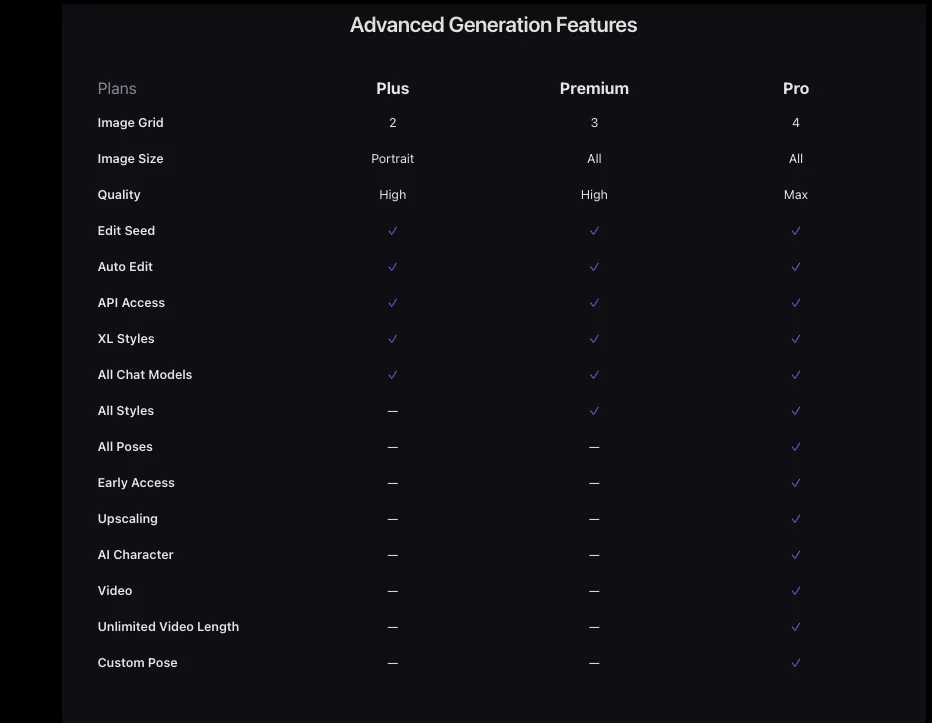
Video requires Pro at $33.99/month, which includes 800 monthly Gems and unlimited Casual generations, according to official pricing. That Casual allowance does not explicitly cover unlimited video generation. Pro provides video access, while Gems form a separate shared balance. No per-video Gem charge is established.
Video extension lets a sequence continue beyond its initial generation. Custom characters help define a recurring fictional subject. Our review also lists anime, cinematic and art styles, alongside negative prompts, pose controls and character face consistency. Those image-creation controls help shape a starting image, but they do not establish equivalent controls for video or guarantee a consistent face throughout a clip.
The advertised 4K output applies to still images. Video resolution and a specific video duration remain unspecified, separate from the confirmed Pro features.
2. OurDream.ai for videos in a companion platform
For companion-centered projects, OurDream.ai combines conversations and media creation through browser/PWA access. Paid chat is unlimited, while video, voice, and most images use a shared DreamCoin balance. More spending on other media leaves fewer coins for clips.
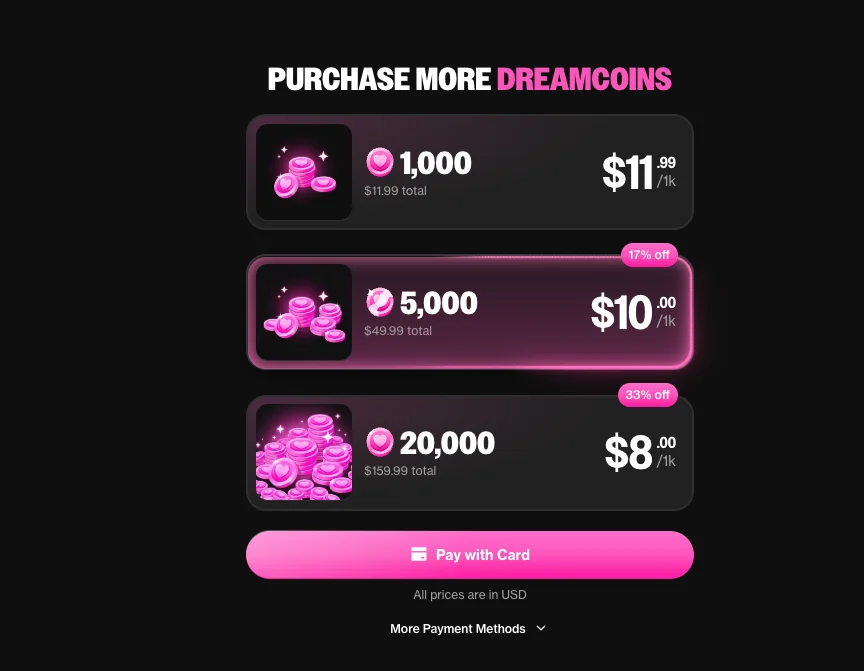
Our review lists Premium at $19.99/month with 1,000 monthly DreamCoins. Its published video examples cost 100 coins for five seconds and 1,200 coins for 60 seconds. Free accounts cannot generate media or buy coins. These are the review’s plan details and rates; the available official information does not establish the minimum subscription required for video.
At those rates, the full Premium monthly allowance covers ten five-second clips if none of the balance goes toward other media. It falls short of the published 60-second example. These examples give concrete costs for budgeting, but they do not establish support for arbitrary custom durations.
Ongoing conversation is a stronger reason to consider the platform than a video-only project. Video resolution and detailed content restrictions remain unspecified, making it harder to assess the platform for a particular production.
3. Nectar AI for video settings and extensions
Clip length, resolution, and extensions are among Nectar AI’s documented video controls. The official FAQs place video generation, voice chat, and long-term Memory in Ultimate, making that tier relevant to projects combining companion interactions with media creation.
Our review lists Ultimate at $34.99/month. The current review repeatedly lists 5,000 monthly credits and identifies 2,500 credits as a $4.99 starter pack. The 2,500-credit figure therefore cannot be treated as the current reviewed subscription allowance. Available official information does not independently confirm Ultimate’s recurring allowance, so neither monthly figure is officially settled.
The official video documentation lists these settings and capabilities:
- Clips run 5 - 30 seconds, allowing the initial length to match the intended scene.
- Output options include 480p/720p/1080p.
- Audio is automatically included in the generated result.
- Extensions add 5, 10 or 15 seconds to the initial sequence.
- Ultimate supports four concurrent video generations, so several requests can run at once.
Extensions give a scene more time after its first result, but they also use credits. The same official documentation states that generations and extensions consume credits at the displayed action price. No fixed video rate is listed, so the monthly balance alone does not establish a reliable clip allowance.
The review names HunyuanVideo as the video engine. Official documentation instead names Nectar Companion Model and Nectar Video Model, leaving the HunyuanVideo attribution unconfirmed by that documentation. Neither set of model names establishes unrestricted content or guarantees output quality.
4. Secrets AI and its Moments cost per video
A published Secrets AI video charge is 600 Moments. The reported specification is an eight-second, 720p adult video at that price, though the resolution is not independently confirmed. The official wiki lists videos at 600 Moments and notes that exact costs may depend on configuration. That specification should therefore not be treated as a universal rate for every setting.
Our review lists Premium at $19.99/month with 8,000 monthly Moments and access to image/video generation. The official store separately advertises Premium at a $9.17/month equivalent, billed as $109.99 annually. The equivalent requires annual payment and does not represent monthly billing.
At the listed 600-Moment rate, 8,000 Moments would cover 13 videos and leave 200 Moments, provided the entire allowance went toward those clips. Moments also cover images, audio calls, and other premium features. According to the official wiki, subscription allowances reset monthly, while purchased Moments never expire.
Projects built around existing artwork face another constraint. The review describes web-only chat and image/video generation with no image/video uploads, ruling out uploading a prepared image to animate it. It also reports strict content rules without listing them, leaving the permitted scope of particular fictional adult scenes unclear.
5. Candy.ai for fictional companion videos
Fictional character storytelling is the focus of Candy.ai’s companion video workflow. Our review describes generated-from-scratch characters aged 18+, with no real-person basis or real-person deepfake creation. Those boundaries suit stories about invented adult characters rather than recreations of identifiable people.
The same review lists Premium at $13.99/month with 100 monthly tokens, unlimited paid text chat, and browser/PWA access. Videos consume tokens on every plan, while images and voice draw from the same balance. Included tokens expire at the end of the billing cycle without rollover.
Unlimited paid text chat separates the cost of conversation from media creation. Dialogue can remain the focus of an ongoing fictional story, with images, voice, and video using tokens when those additions serve a scene. Spending on one media format leaves less for the others, and unused included tokens cannot accumulate toward a later project.
Available official information does not establish the minimum subscription required for video. There is also no verified per-video token rate, clip duration, or resolution. The 100-token monthly allowance therefore cannot be converted into a monthly clip count or used to assess whether the platform meets a specific video requirement.
How the generators compare on creative features
A project’s starting point is one of the main differences among adult AI video generators: an existing image, a generated character, or an ongoing companion conversation. Practical fit depends on support for that starting material and documented controls for developing the clip.
| platform | creative workflow | verified video controls | practical limitation |
|---|---|---|---|
| Promptchan | Image-to-video creation | Advertised video extension | Video duration and resolution unspecified |
| OurDream.ai | Companion chat and generated media; uploads unestablished | Published five-second and 60-second examples | Examples do not establish custom duration controls |
| Nectar AI | Companion interactions and media generation; uploads unestablished | Automatic audio; 5 - 30-second clips; 480p/720p/1080p; 5-, 10-, or 15-second extensions; four concurrent generations on Ultimate | Generations and extensions each consume credits |
| Secrets AI | Chat and media generated within the platform | Listed eight-second specification; 720p not independently confirmed | Reported lack of image/video uploads prevents an upload-based workflow |
| Candy.ai | Fictional companion storytelling; uploads unestablished | Duration and resolution unspecified | Suitability for a particular clip specification remains unclear |
Comparing these generators means considering the starting image separately from the resulting sequence. Promptchan supports a prepared-image workflow, while Secrets AI’s reported lack of uploads excludes that approach. Upload support remains unestablished for the other three platforms.
Nectar’s documented settings cover sound, resolution, and extensions. Promptchan also advertises extension, but equivalent settings are not established. A shared feature name does not show that two platforms offer the same creative control.
Video-focused projects place more weight on source material and clip settings. Companion-centered projects give chat and voice a larger role, with generated media contributing to an ongoing fictional interaction. These are differences in how the features work together, not established differences in realism, generation speed, or reliability.
What subscriptions and video charges cover
Budgeting for video requires both the subscription cost and the charge for the intended clip. The subscription sets the recurring expense, while generation charges determine how far the included currency goes.
- Establish which subscription permits video generation. A listed paid plan does not necessarily establish the minimum tier required for video. Unresolved access requirements leave the entry cost uncertain.
- Identify the plan’s recurring currency allowance. The amount must apply to that subscription and billing period. A separately purchased currency pack cannot stand in for the monthly allowance, and conflicting figures leave this part of the budget unresolved.
- Check the displayed charge for the intended video configuration. A published example supports an estimate for that example, but does not establish the cost of other durations or settings. Planned extensions also need a confirmed charge.
Balances alone do not provide a useful comparison of adult AI video generator pricing. Gems, DreamCoins, credits, Moments, and tokens are separate currencies with different spending rules. The useful figure is the money required to complete a supported task, such as producing a clip at a documented duration and resolution.
Subscription plans may share their included currency across chargeable images, voice, extensions, and other media. Creating an image before animation or adding an extension afterward may draw from the same balance, leaving less for additional clips.
A clip-budget estimate needs both a verified recurring allowance and a verified generation rate. A disputed allowance leaves the available balance unknown. A missing video charge prevents converting that balance into a clip count. An assumed top-up price or an unlimited-use claim does not resolve either missing figure.
Choosing an adult AI video generator that fits the task
The intended creative task determines which adult AI video generator fits. For a project starting with an existing image, support for that image is decisive. Specific output requirements put more weight on documented settings, while an ongoing fictional companion experience makes the relationship between video and conversation more important.
Documented capabilities provide a firmer basis for selection than claims about visual appeal. The available evidence does not establish a tested winner for motion quality, realism, or character consistency. Preferences about the finished look remain separate from whether a platform supports the required workflow.
Unresolved allowances and generation charges limit budget certainty, but documented feature differences still help narrow the choice. A suitable choice combines the required creative workflow, acceptable boundaries for fictional content involving consenting adults, and a video charge that is clear before generation.
Frequently asked questions
Does a video subscription include unlimited clips?
Video access and video usage are separate. The services in this comparison charge for clips through Gems, DreamCoins, credits, Moments or tokens, and some don't publish a fixed video rate. An unlimited text-chat allowance doesn't establish unlimited video generation.
Which option works with an image you already have?
Promptchan supports image-to-video creation in the workflow covered here. Our Secrets AI review reports no image or video uploads. Upload support isn't established for the other three services, so confirm that requirement before choosing a subscription.
Does 4K image generation mean 4K video?
Still-image and video specifications are separate. Promptchan's advertised 4K output concerns images, while its video resolution isn't established in this comparison. Check the specification for the clip you intend to generate.